10-web实战-多表操作-员工列表查询
1. 多表操作
1.1. 表关系
- 一对多
- 多对多
- 一对一
| 关系类型 | 示例说明 |
|---|---|
| 一对多 | 部门(dept)与员工(emp):一个部门有多个员工 |
| 多对多 | 学生与课程(需中间表如 student_course) |
| 一对一 | 用户(user)与身份证(id_card):一人一证 |
💡提示:多对多在物理建模中需通过“中间表”实现(例如:
user_role(user_id, role_id))。
- 两个表连接查询,结果,默认是笛卡尔积。
- 有很多无用数据,如何消除?
- 加连接条件
1.2. 多表查询-连接查询
- 连接查询
- 内连接 (符合连接条件的数据,比如:
emp.dept_id = dept.id)- 隐士内连接
- 显式内连接
- 外连接
- 左外连接 (内连接的结果 + 左边表的不符合连接条件的数据)
- 右外连接
- 内连接 (符合连接条件的数据,比如:
-- 隐式内连接(不推荐)
SELECT * FROM emp, dept WHERE emp.dept_id = dept.id;

-- 显式内连接(推荐,可读性强)
SELECT * FROM emp INNER JOIN dept ON emp.dept_id = dept.id;

-- 左外连接
SELECT * FROM emp LEFT JOIN dept ON emp.dept_id = dept.id;

-- 右外连接
SELECT * FROM emp RIGHT JOIN dept ON emp.dept_id = dept.id;
Important
内连接,只返回两个表匹配的记录,交集。
外连接,返回交集和并集的某一测
左外连接
返回左表的全部记录,右表匹配不到时,对应的列是 null
右外连接
返回右表的全部记录,左表匹配不到时,对应的列是 null
想用户表和订单表的例子。
2. 实验
准备数据
show tables;

drop table if exists users;
drop table if exists orders;
create table users
(
    id   int unsigned primary key auto_increment comment '用户id',
    name varchar(30) not null unique comment '用户名'
) comment '用户表';
create table orders
(
    id      int unsigned primary key auto_increment comment '订单id',
    user_id int unsigned not null comment '用户id',
    product varchar(20)  not null comment '商品名'
) comment '订单表';

select id,name from users;
insert into users
values (null, 'Alice'),
       (null, 'Bob'),
       (null, 'Charlie');
select id,user_id,product from orders;
insert into orders
values (null,1,'Keyboard'),
       (null,2,'Monitor'),
       (null,4,'Mouse');

# 笛卡尔积(两表记录的所有组合)
select * from users inner join orders;
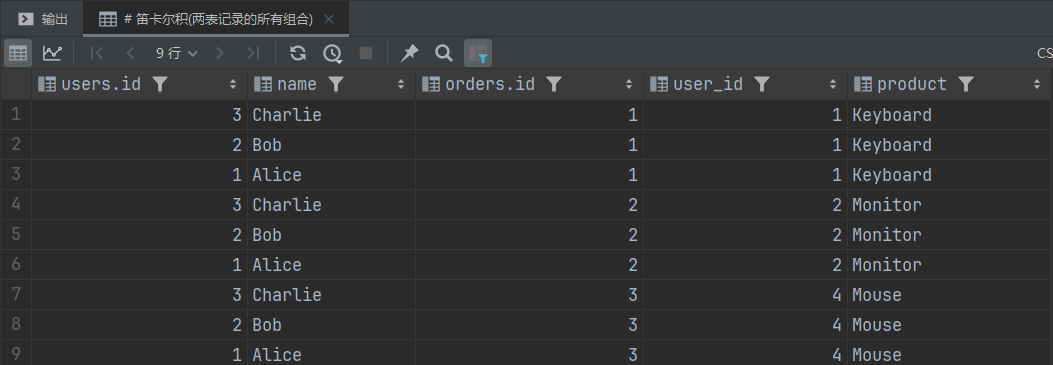
# 内连接,添加连接条件,返回交集(两表匹配的记录/有效数据),消除无效数据
select * from users inner join orders on users.id = orders.user_id;

# 外连接,返回交集和并集的某一侧
# 返回左边所有的数据,右表匹配不到时,对应的列是null
# 返回所有用户
select * from users left outer join orders on users.id = orders.user_id;

# 返回右表所有的数据,左表匹配不到时,对应的列是null
# 返回所有订单
select * from users right outer join orders on users.id = orders.user_id;

✅ 建议优先使用显式连接,语义清晰、便于维护。
2.1. 多表查询-子查询
- 子查询,(按子查询的结果分类)
- 标量子查询
- 列子查询
- 行子查询
- 表子查询
| 类型 | 示例 SQL | 说明 |
|---|---|---|
| 标量子查询 | SELECT name FROM emp WHERE dept_id = (SELECT id FROM dept WHERE name='研发部') |
子查询返回单个值 |
| 列子查询 | SELECT name FROM emp WHERE dept_id IN (SELECT id FROM dept) |
子查询返回一列 |
| 行子查询 | SELECT * FROM emp WHERE (dept_id, job) = (SELECT id, '开发' FROM dept WHERE name='研发部') |
返回一行 |
| 表子查询 | SELECT * FROM (SELECT * FROM emp WHERE salary > 5000) AS high_salary_emp |
子查询作为一张临时表 |
子查询可以书写的位置:
- where之后
- from之后
- select之后
子查询外部的语句可以是insert / update / delete / select 的任何一个,最常见的是 select。
3. 员工列表查询
- 自己用 mapper 实现分页
- count
- list
- 用 page-helper 分页插件实现分页
- 开启分页后,第一个最近的 sql 才会使用分页。
- 这个 sql 不能
;结尾。因为分页插件会对这个 sql,做两侧处理,第一次获取 count 的 sql,第二次获取 list 的 sql, 如果加;, 获取 sql 报错。
SearchParam/QueryParam 当 url 的参数多的时候,后端可以把参数用这个实体封装接收,看起来优雅。
动态 sql 条件查询。
3.1. demo